The MacBook notch as a working tool
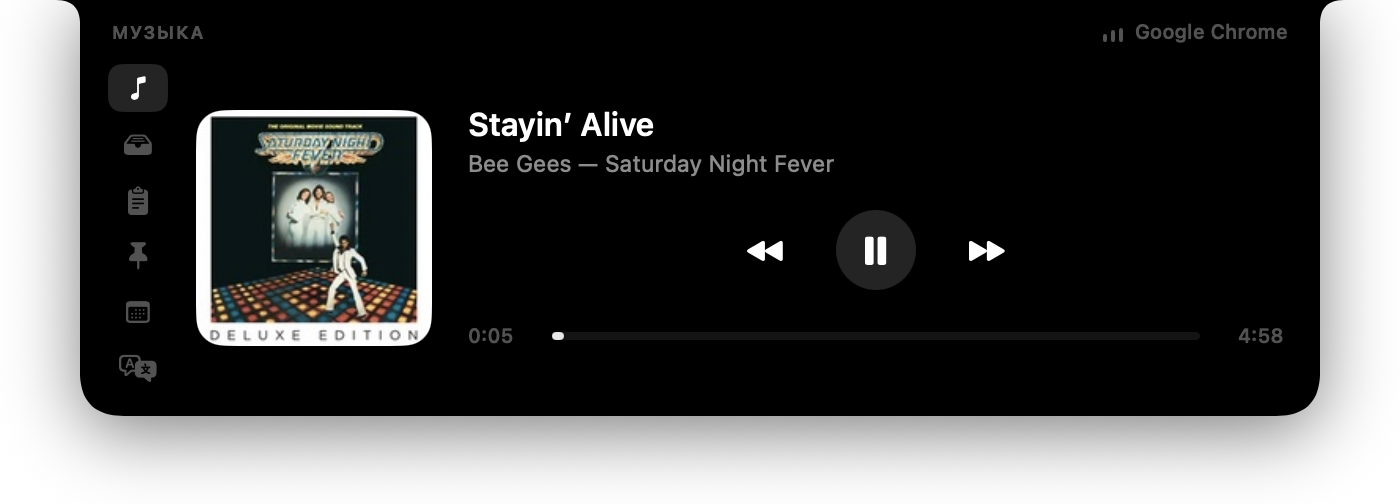
Invisible at rest. Hover the notch and it unfolds into a panel with your music, a shelf for files, clipboard history and your next meeting. Free and open source.
What it asks of your Mac
Nothing at launch. Two permissions, each asked only on a button press, after an explanation: Calendar and Accessibility. The only network traffic is currency rates and, on the fallback path, Spotify artwork. 0 % CPU at rest.
- 0 %
- CPU at rest
- ≈40 MB
- memory
- 0
- asked at launch
- MIT
- free licence
Ten tabs, each one can be switched off
Switching a tab off in Settings removes its icon and stops its background work. Keep only what you use.
Music
Artwork, track, a scrubber that seeks, play and skip. The source is anything macOS sees: Apple Music, Spotify, a YouTube tab.
Shelf
Drag files into the notch, drag them out where they are needed. A screenshot copied on your iPhone lands here too.
Clipboard
The last 40 copies, one click to put any back. Password managers never end up in the history.
Snippets
Addresses, phone numbers, emails you are tired of typing. One click copies; the list is a plain file you can edit.
Calendar
Your next meeting, how long until it starts and a button that joins the call: Zoom, Meet, Teams and five more.
Translate
Offline translation between English and Russian with macOS's own engine. No service, no account.
Currency
Type an amount on either side; rates are refreshed hourly while the tab is on.
Teleprompter
A script that scrolls right under the camera, so on a recording your eyes stay on the lens.
Notes
Scratch space for a number from a call or half a thought. Empty notes clean themselves up.
Utilities
Lock the keyboard and trackpad to wipe them. Hold Esc for 2 seconds to unlock, or wait a minute.
Why people pick Cyclop
Music from anywhere
Anything that shows up in Control Center's Now Playing shows up in the notch — a player, a browser tab, a video. Nothing to install in the browser.
Nothing at launch
No permission dialogs when you open it. Calendar and Accessibility are asked only when you press the button that needs them.
Free, no account
No subscription, no licence server that can go down, no sign-in. MIT licence; the whole source is on GitHub.
Quiet
0 % CPU while you are not looking at it. A tab you switch off stops its background work completely.
Safe to share your screen
One click hides the contents of the clipboard, snippets, calendar and notes during a call or a stream.
Built in the open
Signed and notarised by Apple, reviewed pull requests, every outgoing request listed in SECURITY.md.
Install in a minute
- Download the .dmg above.
- Drag Cyclop into Applications and open it — it is signed and notarised, so it opens on the first try.
- Move the pointer to the notch. On a Mac or display without one, a thin strip at the top centre does the same.
Questions
Is Cyclop free?
Yes, completely: no trial, no subscription, no paid tier. It is open source under the MIT licence.
Does it work on a Mac without a notch?
Yes. On a Mac or external display without a cutout, Cyclop marks a notch of its own: a thin strip at the top centre of the screen opens the panel the same way.
What permissions does it need?
Nothing at launch. Calendar is asked for in the Calendar tab and Accessibility for the keyboard lock, each only when you press the button. Switch a tab off and its permission is never asked.
Does it send anything over the network?
No telemetry and no analytics in the app. Currency rates are downloaded hourly while that tab is on, and Spotify artwork only on the fallback player path. Everything else stays on your Mac.
Which Macs are supported?
macOS 15 or newer on Apple silicon.
How do I update?
Download the new version here and replace the app in Applications. Your settings, snippets and notes stay where they are.